

Insofta 3D Text Commander 是一款由 开发的零 3D 基础门槛快速出图工具,能将普通文本一键转换为精致 3D 效果,适合制作标题、Logo、横幅、演示文稿素材与网页标题,支持导出高清透明背景图与动画,上手快、效率高。
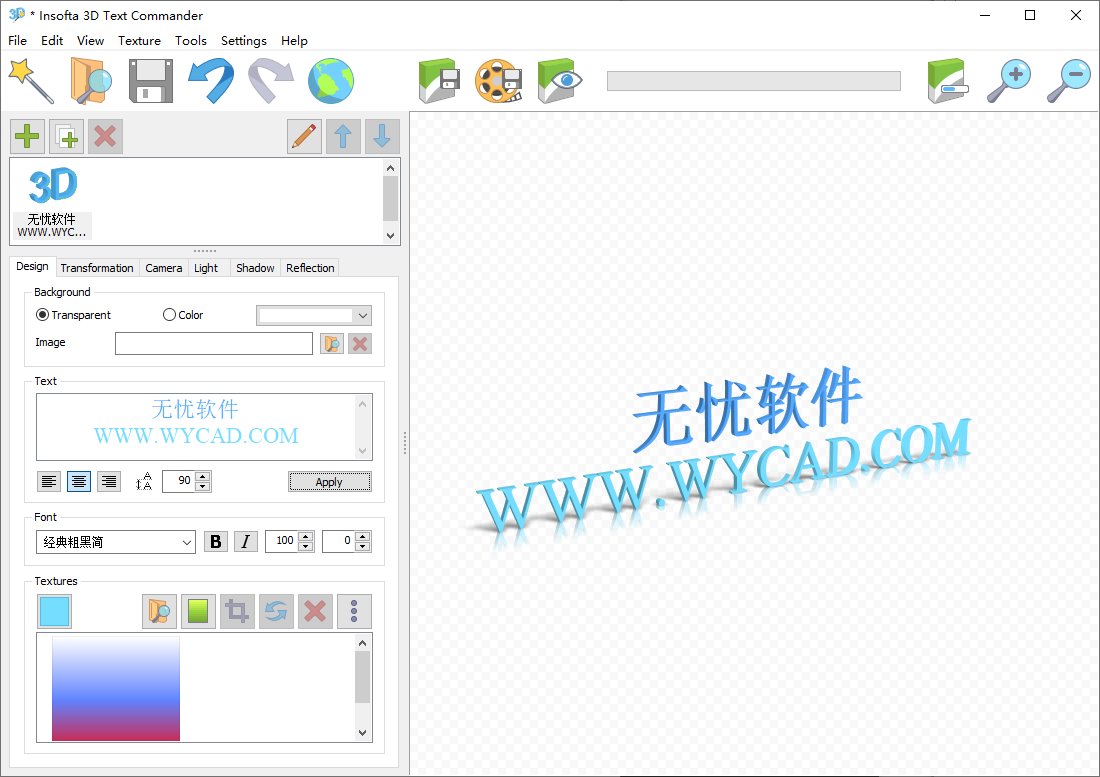
软件功能
文本与 3D 塑形:支持多行长文本、特殊字符;自定义字体、对齐方式;调节挤出深度、倒角与边缘平滑度,生成立体效果。
材质与视觉:提供颜色、渐变、纹理贴图选项;支持光照、反射、阴影柔度调节;可设置透明背景与相机视角,实时预览迭代。
场景与排版:多文本组合场景;实时拖拽调整位置与角度;内置专业模板与纹理库,快速套用。
高清导出与动画:最高 4000×4000 像素抗锯齿渲染;支持 PNG、TIFF 等常用格式;可导出 WebP/APNG/GIF 等 3D 动画。
便捷试用与升级:提供全功能免费试用版;购买后可在线激活升级,无需重装。
软件特点
零门槛高效:无需专业 3D 知识,单界面操作,几分钟即可完成成品。
真实质感:材质、光照、反射与阴影参数精细,视觉效果接近专业软件。
灵活可控:全参数可调,支持多文本分层与自定义背景,适配多场景。
高分辨率输出:支持超高清渲染与透明背景,满足印刷与数字媒体需求。
跨平台兼容:支持 32/64 位 Windows 系统,可读取系统全部字体,兼容性广。
更新日志
https://www.insofta.com/3d-text-commander/help/changelog.html
v7.0.0
You can now set a background image. This setting is located on the Design tab.
New animation save formats have been added: MP4, Single PNG + CSS.
You can now change the background color in the preview area, even for projects with a transparent background.
Image zooming has been added to the Crop dialog and the saved image view dialog (Ctrl + mouse wheel).
A project folder history has been added to the File menu.
In the Open and Save dialogs (for projects/images), a list of folders from which files have already been selected can now be found in the Quick Access area under the 3D Text Commander heading.
A new option, Crop to content, has been added to the Save Image and Save Animation dialogs. With this option enabled, all empty areas are cropped when saving. With it disabled, the center of the scene will be in the center of the image/animation.
A Texture menu has been added to the main menu, containing all tools for working with textures.
A new Batch Processing tool has been added. Using it, you can process all projects in a folder with just a couple of clicks.
In the New Project wizard, you can now choose whether to load lighting, shadow, and reflection settings from a template or keep the current ones.
Memory usage has been reduced when rendering at maximum quality.
Added the Light sources fixed relative to camera option in the lighting settings. Added Intensity for each light source.
You can now increase the width of the tabs in the main window using the splitter between them and the preview area.
Several minor interface improvements.
Portuguese interface language added.
Several bugs fixed.
下载地址
Insofta 3D Text Commander(文本转3D效果) 7.0.0 便携版
https://pan.quark.cn/s/4b30926cc406
https://pan.xunlei.com/s/VOqdiYmZPV9iYRTPK1BMkn7RA1?pwd=2jp2#
- 本网站名称:无忧软件网
- 本站永久网址:https://www.wycad.com
- 本网站的内容均来源于网络,仅供大家学习与交流,如有侵权,请联系站长wycad@foxmail.com删除处理。
- 本站一切资源不代表本站立场,并不代表本站赞同其观点和对其真实性负责。
- 本站一律禁止以任何方式发布或转载任何违法的相关信息,访客发现请向站长举报
- 本站资源大多存储在云盘,如发现链接失效,请联系我们我们会第一时间更新。wycad@foxmail.com
